


Cost-Saving Options: Print orders, in many cases, are now more specialist, high-end publications involving more creative differentiation as a result of digital replacing traditional media as the dominant format for mass consumption. For print customers, this can make things more difficult by expanding their options and possibly increasing their costs as well.
However, a beautiful print doesn’t have to be expensive. With a little knowledge and the right level of help from your magazine printing company, you may be able to find the simplest parts of your publication where prices can be cut. This will allow you to put money toward the parts that really make a difference.
The suggestions outlined in this article are meant to make you a more knowledgeable print buyer who is better equipped to deliver exceptional print work without hurting your profit margin.
| What you’ll learn in this guide
Magazine printing costs in the UK depend on a handful of key decisions — quantity, page count, paper weight, printing method, binding, and finishes. Change any one of them smartly, and you can cut your cost per copy by 30–60% without touching the quality your readers see. This guide breaks down every lever, in plain English. |
Table of Contents
Why Magazine Printing Costs Vary So Much in the UK
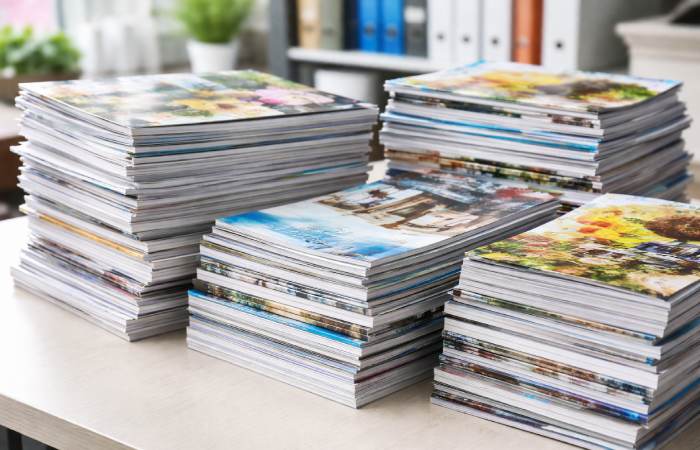
You can get quotes for ‘the same magazine’ from two UK printers and find prices that differ by 50% or more. That’s not one printer ripping you off — it’s because magazine printing costs are driven by several independent variables, and small changes to any one of them ripple across the entire bill.
Magazine printing costs are influenced by multiple technical variables, which are broadly explained in this overview of the printing process on Britannica
Here are the main cost drivers, ranked by impact:
| Cost Driver | What It Means | Impact Level |
| Print Quantity | Fixed setup costs spread across all copies — more copies = cheaper per unit | Very High |
| Page Count | More pages = more paper, ink, press time, and handling | High |
| Printing Method | Digital suits short runs; litho (offset) gets cheaper at 1,000+ copies | High |
| Paper Stock & GSM | Heavier, coated paper costs more — and increases postage weight | Medium |
| Binding Method | Saddle stitch is cheapest; perfect binding adds cost but gives a spine | Medium |
| Finishing & Extras | Lamination, spot UV, foiling — each adds cost; most are optional | Low–Medium |
1. Print More Copies Per Run (or Combine Runs)
This is the most powerful cost lever in magazine printing — and the most misunderstood. Fixed setup costs remain the same regardless of quantity. Every magazine job requires artwork checks, press setup, calibration, and initial waste during make-ready. Those costs are spread across every copy you print. So the more copies in a single run, the cheaper each one becomes.
| Print Run Size | Cost Per Copy (approx.) | Best Method | Verdict |
| 1–50 copies | £3–£8+ per copy | Digital | High cost |
| 100–250 copies | £1.50–£3 per copy | Digital | Moderate |
| 500–1,000 copies | £0.70–£1.50 per copy | Digital or Litho | Good value |
| 2,000–5,000 copies | £0.30–£0.80 per copy | Litho (offset) | Strong savings |
| 10,000+ copies | £0.15–£0.40 per copy | Litho (offset) | Best unit cost |
Note: Prices vary significantly by specification. Always request tailored quotes for your exact project.
| Cost-Saving Tip: Batch Multiple Issues
If you publish quarterly, consider printing two or three issues at once during the same press run. Many UK printers will hold stock and dispatch in batches — this reduces your unit cost while avoiding large immediate storage needs. |
2. Choose the Right Printing Method: Digital vs. Litho
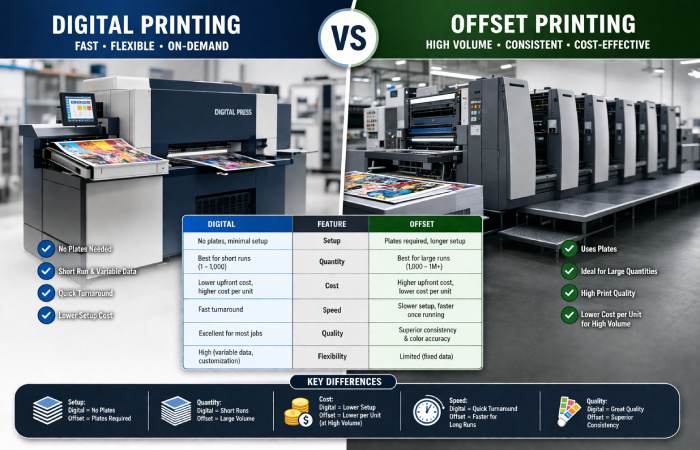
UK magazine printers use two main production methods, and choosing the wrong one for your volume is one of the most common — and costliest — mistakes.
For a deeper understanding of how digital and offset printing differ in cost, quality, and scalability, refer to this offset printing explanation on Wikipedia
Digital Printing
Digital printing is cost-effective for short runs, offers fast turnaround, and allows personalisation. Files go straight from your PDF to the press — no printing plates needed. Digital is ideal for runs under 500–1,000 copies, test prints, personalised editions, or when you need a fast turnaround.
Litho (Offset) Printing
Litho printing is better for high-volume printing, consistent colour, and premium finishes. Plates are made first (a setup cost), then ink is applied at high speed. The per-unit cost drops sharply as volume increases, making it the go-to for established publishers printing 1,000+ copies per run.
| Factor | Digital Printing | Litho Printing |
| Best run size | Under 1,000 copies | 1,000+ copies |
| Setup cost | Low / none | Higher (plates needed) |
| Cost per unit at volume | Stays relatively high | Drops significantly |
| Turnaround time | Fast (2–5 days typical) | Longer (5–15 days) |
| Personalisation | Yes (variable data) | Not practical |
| Colour consistency | Good | Excellent |
| Premium finishes | Limited | Full range |
| Which is right for you?
If you’re printing fewer than 500 copies, digital is almost always cheaper. Above 1,000 copies, get quotes for both and compare total cost — not just unit cost. Factor in turnaround time too, as faster digital delivery may save money on time-sensitive issues. |
3. Optimise Your Page Count
More pages increase cost because each extra page requires additional paper, ink, and press time. A magazine with more pages uses more sheets, raising material costs. It also takes longer to print, fold, collate, and bind.
The key rule to know: magazine pages must always be in multiples of four. That’s because pages are printed on large sheets that are folded down. A 36-page magazine, for example, is not possible with saddle stitch — you’d need 32 or 40 pages.
| Cost-Saving Tips for Page Count
• Audit every issue for content that can move online — a QR code linking to extra content can cut 8–12 pages per issue. • Tighten your design layouts to reduce page count. • Reduce full-page ads; use half-page formats for the same visual impact with fewer pages. • Always spec to a multiple of four — unnecessary extra pages are pure waste. |
4. Choose Paper Wisely: GSM, Coating & Weight
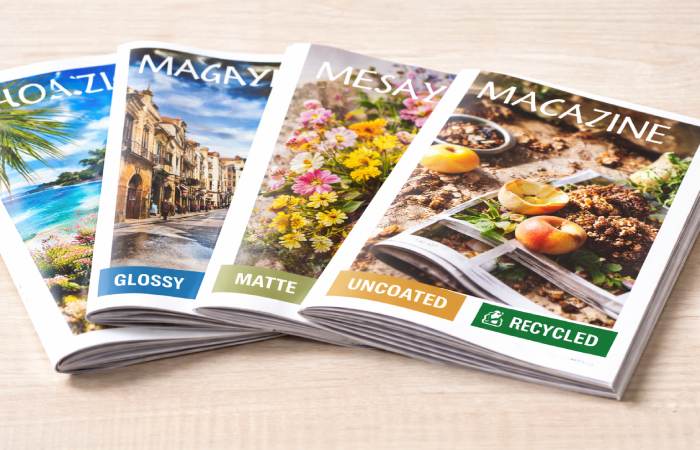
Paper is one of the biggest cost components in any print job — and it also affects postage, which can easily double your distribution cost if you’re mailing copies. A cost-effective, professional-looking magazine typically uses 80–100gsm silk for internal pages and a 200–250gsm silk cover.
| Paper Type | Typical GSM | Best For | Cost Level |
| Offset / Uncoated | 80–90gsm | Text-heavy, community pubs | Lowest |
| Silk / Satin | 90–130gsm | Best all-round — sharp text + good images | Low–Mid |
| Gloss coated | 90–150gsm | Photo-heavy, brand magazines | Mid |
| Premium heavyweight | 150–170gsm+ | Luxury / art publications | High |
| Watch Your Postage Costs
If you mail your magazine, paper weight directly affects your distribution cost. A switch from 130gsm to 100gsm internal pages can reduce copy weight enough to drop a Royal Mail pricing band — potentially saving hundreds of pounds per mailing. Always weigh a dummy copy before finalising your spec. |
5. Pick the Right Binding Method
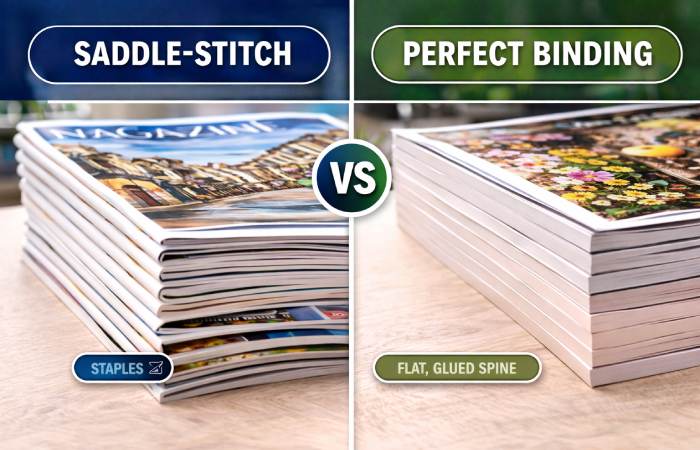
Binding is one of the clearest places to save money — or waste it. There are two options that cover 90% of UK magazine projects.
Saddle Stitch (Staple Binding)
Saddle stitching is the least expensive of all binding methods. The printed pages are stapled through a fold and trimmed to size. It works best for magazines up to around 48–64 pages. Publications bound with saddle stitch can lay flat when opened, which is beneficial for many types of content. The main limitation: no printable spine area.
Perfect Binding
Perfect binding glues pages to a square spine — the format used for most paperback books. It gives your magazine a premium, shelf-worthy look and a printable spine. However, perfect binding costs more than saddle stitch — in design, materials, production, and often shipping.
| Feature | Saddle Stitch | Perfect Binding |
| Page count range | 8–64 pages | 28–700+ pages |
| Cost | Lowest — best for budget | Higher |
| Printable spine? | No | Yes |
| Lies flat when open? | Yes | No |
| Production speed | Faster | Slower |
| Best for | Regular issues, newsletters | Annual / prestige editions |
6. Skip (or Simplify) Expensive Finishing Options
Finishing options — lamination, spot UV varnish, embossing, foiling — can add 20–40% to your print bill. Here’s a quick guide to what’s worth it and what you can skip.
| Finish | What It Does | Cost Impact | Worth It? |
| Gloss lamination (cover) | Shiny, vivid, protective coating | Low addition | Usually yes |
| Matt lamination (cover) | Subtle, sophisticated finish | Low addition | Usually yes |
| Spot UV varnish | Glossy highlights on specific areas | Moderate | Special editions only |
| Embossing / debossing | Raised or recessed design on cover | High addition | Luxury only |
| Foil stamping | Metallic finish on specific elements | High addition | Luxury only |
| Key Rule on Finishes
Cover lamination is almost always worth it — it protects the cover, enhances colour, and costs very little extra. Everything else (spot UV, embossing, foil) is for special or premium editions where the wow factor justifies the budget. A well-designed cover on matt-laminated 250gsm silk will look more premium than a mediocre design with expensive foiling. |
7. Choose a Cost-Efficient Size
Magazine size directly affects how efficiently paper is used — and wasted. Standard paper sizes (A4, A5) are cut from standard sheet sizes with minimal waste. Custom or unusual dimensions often require oversized sheets that are trimmed down — you’re paying for paper you’re throwing away.
- A4 (210 x 297mm) — The most common format. Best value for full-content magazines. Printers are fully set up for it, reducing setup time.
- A5 (148 x 210mm) — Roughly half the paper cost of A4 for the same number of pages. Great for community newsletters, mini publications, or inserts.
- Custom sizes — Can look distinctive but typically cost more due to paper waste and additional setup. Only worth it if the format is a core part of your brand identity.
8. Plan Ahead: Lead Time Saves Money
Faster turnaround may increase cost due to prioritised scheduling, production adjustments, or expedited logistics. Longer lead times generally help maintain standard pricing. If you can give a printer 10–15 working days instead of 3–5, you’ll typically pay standard rates rather than rush rates.
- Set your distribution date first — work backwards from when readers need their copy.
- Allow 10–15 working days for print production. More for litho runs; digital can be as fast as 2–5 days at standard rates.
- Set your artwork deadline accordingly — add 3–5 days for proofing and corrections before submitting to press.
- Book your print slot in advance — for busy periods (Christmas, trade show season), booking weeks ahead secures standard pricing and your slot.
9. Consider a Digital / Print Hybrid Model
One of the most effective cost-saving strategies for 2026 isn’t about printing at all — it’s about printing fewer copies more strategically.
Many UK publishers are moving to a hybrid model: a smaller print run for subscribers, premium readers, or display copies — paired with a free digital edition (PDF, Issuu, or web version) for general distribution. This lets you maintain the prestige and tactile experience of print while dramatically reducing your unit cost by printing at a more economical quantity.
- Print 500 premium copies for subscribers and key distribution points.
- Distribute a free digital edition via your email list or website.
- Use digital analytics to understand which content is most popular — then invest that insight back into your print edition.
10. Consider Mono (Black & White) Interior Pages
If your magazine is predominantly text-based — think trade publications, community newsletters, literary magazines — a fully colour interior is not always necessary. Choosing mono (black and white) interior printing is perfect for text-heavy content and can significantly reduce per-page printing costs.
A common middle-ground approach: use full colour on the cover and the first few editorial pages (which readers see first), then switch to mono for text-heavy sections. This gives a professional impression while keeping interior page costs down.
11. Submit Artwork Correctly (Avoid Costly Reprints)
One reprint due to an artwork error can cost more than all the savings you’ve made elsewhere. Here’s a quick checklist of what UK printers need from your files:
- Save as a single multi-page PDF (saddle stitch) or separate cover and inner PDFs (perfect bound).
- Use CMYK colour mode — not RGB. RGB files will be auto-converted, often with noticeable colour shifts.
- Set image resolution to 300 DPI minimum for all photos and graphics.
- Include a 3mm bleed on all edges.
- Keep all important text and images at least 3–5mm inside the trim edge.
- Embed all fonts in your PDF to avoid substitution issues.
- Set black text as 100% K only — not rich black — for crisp, readable text.
To ensure your files meet professional standards, follow these widely accepted PDF and print preparation basics on Wikipedia
12. Always Get Multiple Quotes — and Know What to Compare
UK magazine printing prices vary enormously between suppliers. Comparing quotations helps identify the most efficient option. But you need to compare like-for-like — a quote that looks 30% cheaper may exclude VAT, delivery, or use a lighter paper stock.
When requesting quotes, always specify:
- Finished size (e.g., A4, A5, custom)
- Total page count (including covers) — confirm it’s a multiple of four
- Cover paper weight and coating (e.g., 250gsm silk, matt lamination)
- Interior paper weight and type (e.g., 100gsm silk)
- Binding method (saddle stitch or perfect bound)
- Print quantity
- Delivery requirements (address, timescale)
- Whether the price includes or excludes VAT and delivery
| Request Quantity Breaks
When getting quotes, always ask for pricing at two or three different quantities — e.g., 250, 500, and 1,000 copies. You might find that printing 500 copies costs only marginally more than 250, making the extra copies essentially free. This is common with litho printing where setup costs dominate. |
UK Magazine Printers Worth Comparing
Here are well-regarded UK-based (and UK-serving) magazine printers to include in your quote process. Always verify current pricing directly with each supplier.
| Printer | Best For | Notes |
| Mixam UK | Short–medium runs | Online instant quoting across a wide range of specs. Offers standard and expedited services. |
| HelloPrint UK | Competitive online pricing | Offers glossy, silk, and offset paper options. Well-suited for marketing-led magazines. |
| Ex Why Zed | Independent & arts publishers | Strong reputation among independent publishers. Good range of binding options with quality guidance. |
| Gemini Print Solutions | Trade & volume with fulfilment | Services include storage, packing, addressing, and delivery. Good for publishers who need fulfilment alongside printing. |
| YouLovePrint | Simple UK online ordering | Multiple binding options. Clear spec guidance. Good option for smaller independent publishers. |
| The Sustainable Printworks | Eco-conscious printing | No VAT or delivery charges. Monochrome printing option for text-heavy content. Specialises in community magazines. |
Your Cost-Saving Checklist: Quick Wins at a Glance
- Print the right quantity for your method. Under 500 copies: go digital. Over 1,000: get litho quotes.
- Batch issues together if you publish quarterly or less frequently to reduce setup costs.
- Keep page count to a multiple of four and audit every issue for removable content.
- Choose silk 90–100gsm for interior pages — the sweet spot of quality and cost.
- Use saddle stitch for issues under 64 pages. Only use perfect binding when your content demands it.
- Cover lamination yes; spot UV, foil, and embossing only for special editions.
- Stick to A4 or A5. Custom sizes cost more due to paper waste.
- Give printers 10–15 working days at standard rates whenever possible.
- Get quotes from at least three UK printers using the same full spec.
- Submit print-ready PDFs correctly — CMYK, 300 DPI, 3mm bleed, embedded fonts.
- Consider a hybrid model — smaller premium print run plus free digital edition.
- Consider mono interior pages for text-heavy publications.
Frequently Asked Questions
How much does it cost to print a magazine in the UK?
It depends heavily on your specification, but as a rough guide: a 32-page A4 magazine on silk paper with saddle stitch binding might cost £0.80–£1.50 per copy for 500 copies with digital printing, or around £0.40–£0.70 per copy at 2,000+ copies with litho. Always request tailored quotes for your exact spec.
Is VAT charged on magazine printing in the UK?
Many printed publications — including magazines, newspapers, and books — are zero-rated for VAT in the UK. However, this depends on the specific nature of the product. Promotional publications that are primarily advertising may be subject to standard rate VAT. Always confirm the VAT position with your printer and HMRC guidance.
What is the minimum quantity for magazine printing in the UK?
Some UK printers will print as few as 100 copies in a single run. For digital print-on-demand, some suppliers will print single copies. The trade-off is always cost per unit: small runs cost significantly more per copy.
What’s the most cost-effective paper for a UK magazine?
For most UK magazines, 90–100gsm silk for interior pages and 200–250gsm silk with matt lamination for the cover is the sweet spot. It looks highly professional, photographs reproduce well, and the cost is lower than heavier-weight stocks.
Can I reduce printing costs by using black and white interior pages?
Yes — significantly. Mono (black and white) interior pages cost considerably less per page than full colour. If your magazine is text-led — a trade publication, community newsletter, or literary journal — mono pages with a colour cover is a very cost-effective combination.
Should I use a local printer or an online UK printer?
Both have merits. Local printers offer easier communication, the ability to see samples in person, and potentially faster turnaround for urgent jobs. Online UK printers typically offer lower prices through automated processes and volume discounts. For your first run with any new printer, getting a physical proof first is always recommended.
Final Thoughts
Cutting magazine printing costs in the UK doesn’t mean settling for something that looks cheap. It means making smart decisions about the variables that affect your bill — and knowing which ones deliver genuine savings versus false economies.
Start with quantity and method (the biggest levers), then work through paper, binding, and finishes. Build lead time into your production calendar. Get multiple quotes using a precise, consistent specification. And always proof before you print.
Do all of that, and there’s no reason you can’t produce a magazine that looks every bit as good as a newsstand title — for a fraction of what you’d naively spend.
Disclaimer: Prices quoted in this article are approximate guides only and subject to change. Always request up-to-date quotes directly from printing suppliers for your specific project. This article does not constitute professional printing or financial advice.