


Binance offers two types of trailing stop Binance orders: the limit and the vanilla. You can choose between these two depending on your needs. In the limit, you can configure a percentage to trigger a trailing stop. The latter is more useful in volatile markets.
This guide covers everything: what trailing stops are, how they work on Binance (both Spot and Futures), how to set them up, real worked examples, common mistakes, and when to actually use them.
Table of Contents
What Is a Trailing Stop Order?
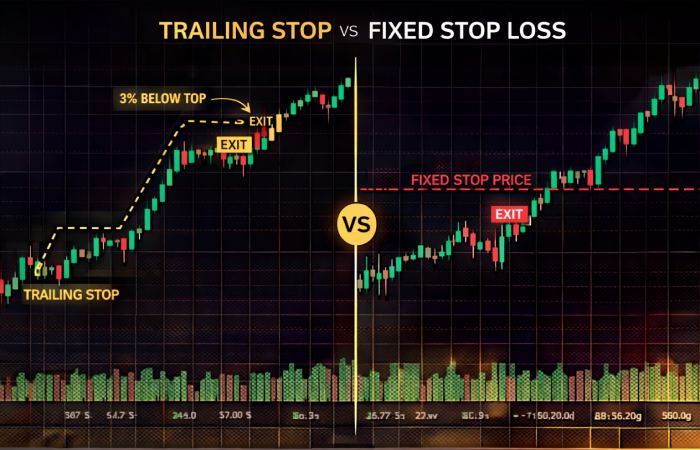
A trailing stop is an advanced order type that sits between a regular stop-loss and an automated take-profit. Here’s the core idea:
- Normal stop-loss: Fixed price. Once you set it, it doesn’t move. If BTC pumps from $60,000 to $90,000, your stop is still at $58,000.
- Trailing stop: Dynamic price. It follows the market upward (for sell orders), locking in more profit as price rises — but stays put the moment price starts falling.
The result? You ride a trend as far as it goes, and exit automatically at the first meaningful reversal. You don’t need to babysit the chart.
✓ What it does well
Protects gains as price climbs. Locks in profit automatically. Works while you sleep. Adapts to market movement.
✗ What it doesn’t do
It cannot guarantee your exact exit price in fast markets. In extreme volatility, slippage may occur.
How Binance Trailing Stops Actually Work
Binance uses two key inputs to build a trailing stop:
- Activation Price (optional): The price at which the system starts tracking. If you skip this, it defaults to the current market price.
- Trailing Delta / Callback Rate: The percentage reversal that triggers your order. On Spot, it’s called “trailing delta” (0.1%–20%). On Futures, it’s called “callback rate” (0.1%–10%).
The Mechanics of a Sell Trailing Stop (Long Trade)
Let’s say BTC is at $80,000 and you place a sell trailing stop with a 5% trailing delta.
How the trailing price moves
- BTC rises to $90,000 → Trailing stop price = $90,000 × (1 – 5%) = $85,500
- BTC rises further to $100,000 → Trailing stop = $100,000 × (1 – 5%) = $95,000
- BTC falls from $100,000 to $94,999 → ORDER TRIGGERS (price dropped 5%+)
Key rule: the trailing stop price only moves up when price goes up. It freezes the moment price starts falling. Once frozen, if price drops below it by the set delta, your order fires.
The Mechanics of a Buy Trailing Stop (Short Trade)
The same logic applies in reverse for short positions. The trailing price follows the market downward, and triggers a buy when price bounces back up by your chosen percentage.
Buy trailing stop example
- BTC is at $80,000, trailing delta = 5%
- BTC drops to $60,000 → Trailing buy price = $60,000 × (1 + 5%) = $63,000
- BTC bounces to $63,001 → BUY ORDER TRIGGERS
Pro Tip
The “activation price” is your safety net. If you don’t want the trailing stop to activate until BTC hits $85,000 (for example), set the activation price to $85,000. The system won’t start tracking until then — useful if you expect some initial dip before a big move.
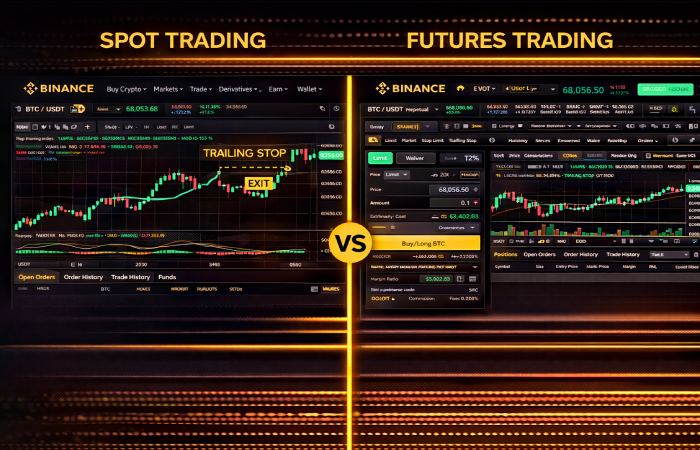
Spot vs. Futures Trailing Stops: Key Differences
| Feature | Spot Trailing Stop | Futures Trailing Stop |
|---|---|---|
| Parameter name | Trailing Delta | Callback Rate |
| Range | 0.1% – 20% | 0.1% – 10% |
| Order execution type | Limit order | Market order |
| Leverage available | No (or limited on margin) | Yes, up to 125x |
| Price reference | Last price | Last price or Mark price |
| Limit price required? | Yes | No (market order) |
The most important difference: Spot trailing stops execute as limit orders. You must set a limit price. If the market drops too fast and blows past your limit, your order may not fill. Futures trailing stops execute at market price, so they almost always fill — but you lose price precision.
How to Set Up a Trailing Stop on Binance (Step by Step)
On Binance Spot
Log into Binance and navigate to the Spot trading page for your pair (e.g., BTC/USDT).
Click where it says “Limit” or “Market” — you’ll find “Trailing Stop” in the dropdown list.
If blank, the order activates immediately at current market price. Set it only if you want to delay activation.
This is the reversal % that triggers your order. Typical range: 1%–5% for most traders. Higher volatility assets need a wider delta.
For sell orders: set this slightly below your trailing stop trigger price. For buy orders: slightly above. This is the price your limit order is placed at when triggered.
Review and click “Sell” or “Buy”. The order appears in your open orders as “Trailing Stop”.
Important: Set your limit price correctly
For a sell order, the limit price should be below where your trailing stop triggers — this ensures the order executes even if there’s brief slippage. If you set it too tight, the order might not fill in fast-moving markets.
On Binance Futures
Go to Futures → choose your pair (BTCUSDT perpetual is most common).
In the order panel on the right, select Trailing Stop from the dropdown.
This is your trailing percentage (0.1%–10%). Think of it as how much reversal you’re willing to tolerate before exiting.
Works the same as Spot — the trailing only starts once price reaches this level.
Mark Price is safer and less prone to manipulation. Last Price reacts faster but can trigger on wicks.
Real-World Examples
Example 1: Protecting Profits in a Bull Run (Sell Trailing Stop)
You bought ETH at $2,000. It’s now at $3,500. You don’t want to sell yet — the trend looks strong — but you also don’t want to give back all your gains if it reverses.
You place a sell trailing stop with a 5% trailing delta. Here’s what happens:
| Market Price | Trailing Stop Price | Status |
|---|---|---|
| $3,500 | $3,325 | Order active, tracking up |
| $4,000 | $3,800 | Trailing up with price |
| $4,500 | $4,275 | Still tracking — new high |
| $4,200 | $4,275 (frozen) | Price dropped, stop frozen |
| $4,274 | $4,275 | TRIGGERED — Sell order placed |
You entered at $2,000 and exited near $4,274. A 113% gain — all without staring at a chart.
Example 2: Entering at the Best Price (Buy Trailing Stop)
You want to buy SOL but you think it’ll dip further before going up. You place a buy trailing stop at the current price of $150, with a 3% callback rate.
SOL drops to $120, so your trailing buy price is now $123.60 ($120 × 1.03). When SOL bounces from $120 back up to $123.60 — your buy order fires. You entered near the local bottom, automatically.
Choosing the Right Trailing Delta (This Is Where Most People Get It Wrong)
Setting the wrong trailing delta is the #1 mistake traders make with trailing stops. Too tight, and normal price noise triggers your stop too early. Too wide, and you give back too much profit before exiting.
| Asset Type | Recommended Delta | Reasoning |
|---|---|---|
| BTC (low volatility) | 2%–4% | Tighter moves, less noise |
| ETH (mid volatility) | 3%–6% | Moderate swings |
| Altcoins (high volatility) | 5%–15% | Large wicks common |
| Memecoin / micro-caps | 10%–20% | Extreme swings — if you even use stops |
Use ATR as your guide
A practical method: look at the Average True Range (ATR) of the asset over the last 14 candles. Set your trailing delta to roughly 1.5–2× the daily ATR percentage. This accounts for normal price noise while still catching real reversals.
Advantages and Limitations
Why Trailing Stops Are Powerful
- Removes emotion from trading. You don’t need to decide when to sell — the system decides based on rules you set in advance.
- Works 24/7. Crypto markets never sleep. Your trailing stop stays active even when you’re offline.
- Locks in gains dynamically. Unlike a fixed take-profit, a trailing stop lets you capture more upside if the trend continues.
- Combines stop-loss and take-profit functions. It protects against downside and captures upside in a single order.
Limitations to Be Aware Of
- Price wicks can trigger early exits. A sudden wick down — especially on low-liquidity altcoins — may trigger your trailing stop even if the broader trend is intact.
- Not ideal for sideways markets. In choppy, range-bound markets, trailing stops may trigger repeatedly without clear trend direction.
- Spot trailing stops are limit orders. In extreme crashes, your limit might not fill if price gaps past it.
- Futures trailing stops execute at market. No price guarantee — just fast execution.
Trailing Stop vs. Stop-Limit: Which Should You Use?
Many traders confuse these two order types. Here’s the core difference:
| Trailing Stop | Stop-Limit | |
|---|---|---|
| Stop price | Moves dynamically with market | Fixed by you |
| Best for | Trending markets, protecting gains | Defined risk levels, fixed targets |
| Flexibility | High — adjusts automatically | Low — static price |
| Manual adjustment needed? | No | Yes (you must update manually) |
| Recommended when | You expect the trend to continue | You have a specific price target in mind |
In short: if you want to ride a trend, use trailing stops. If you have a specific price in mind for your exit, use stop-limit.
3 Practical Trailing Stop Strategies
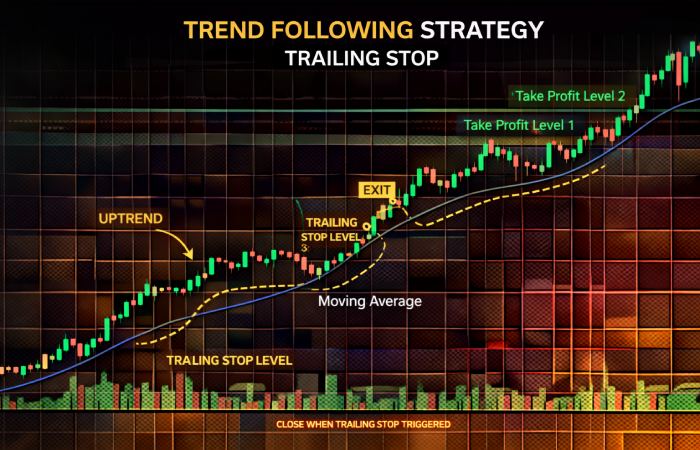
Strategy 1: The “Set and Forget” Trend Rider
Best for: position traders who don’t watch charts all day.
Set a trailing stop with a wide delta (7%–10%) right after a confirmed breakout. Let the position run. The wide delta keeps you in during normal pullbacks but exits you if the trend truly reverses. You might give back some profit, but you capture the bulk of long moves without constant monitoring.
Strategy 2: The Tightening Ladder
Best for: active traders who want to maximize profits on strong moves.
Start with a wide trailing delta (8%) when the trade first runs in your favor. As the position becomes more profitable, cancel the order and reset a tighter trailing delta (3%–4%). This protects more of your profits as the gain grows, without cutting the trade too early at the start.
Strategy 3: The Reversal Catcher (Buy Trailing Stop)
Best for: traders who want to buy dips automatically.
When an asset you want to own is in a downtrend, place a buy trailing stop. The order tracks the price downward and triggers a buy the moment it bounces up by your callback %. You automatically buy near the bottom of the move without trying to time the exact low — because nobody can do that consistently.
Common Mistakes and How to Avoid Them
- Setting the delta too tight on volatile assets. A 1% trailing delta on a memecoin will trigger on every minor wick. Always match your delta to the asset’s typical daily price range.
- Forgetting to set the limit price correctly (Spot). If your limit price is set too close to the trailing trigger, a fast price drop might not get filled. Give yourself 0.5%–1% of buffer below the trigger for sell orders.
- Using trailing stops in sideways markets. In consolidation, trailing stops trigger and re-trigger constantly, generating losses and fees. Wait for a trend before deploying them.
- Ignoring liquidity. On thin altcoin pairs, even a triggered sell trailing stop (Spot) may only partially fill if liquidity is low at your limit price.
- Confusing Last Price and Mark Price triggers (Futures). Always prefer Mark Price — it’s manipulation-resistant. Last Price reacts faster but is susceptible to temporary price spikes that don’t reflect real market moves.
Frequently Asked Questions
What happens if the market crashes so fast my trailing stop doesn’t fill?
On Spot, your trailing stop places a limit order, so if the market gaps past your limit price, the order may not fill. On Futures, it executes at market, so it will fill — but at whatever market price is available, which could include slippage. In extreme crashes (like exchange outages), no order type is immune.
Can I use trailing stops on Binance mobile app?
Yes. The Binance mobile app supports trailing stop orders for both Spot and Futures. The interface is the same — tap the order type dropdown and select “Trailing Stop.”
Does the trailing stop work when Binance is down?
Your order sits on Binance’s servers, not your device — so it remains active during internet outages on your end. However, if Binance itself experiences downtime, all orders (including trailing stops) may be delayed or paused.
What’s the difference between trailing delta and callback rate?
They’re the same concept with different names. Binance calls it “trailing delta” on Spot and “callback rate” on Futures. Both represent the percentage reversal from peak (or trough) price that triggers your order. The range is different: Spot allows up to 20%, Futures only up to 10%.
Can I set a trailing stop on my existing open position?
Yes. On Futures, when you have an open long position, you can place a sell trailing stop below the current price to protect it. On Spot, you would place a sell trailing stop for any coins you currently hold.
Is a trailing stop the same as a trailing stop-loss?
Essentially yes — “trailing stop” and “trailing stop-loss” refer to the same order type. Some traders distinguish them by use case (stop-loss = protection, trailing = also capturing gains), but mechanically they work identically on Binance.
Final Thoughts
A Binance trailing stop is one of the most underutilized tools in crypto trading. Most beginners either don’t know it exists or think it’s too complicated. But once you understand the two key inputs — activation price and trailing delta — it becomes one of the simplest and most powerful things you can add to your trading toolkit.
Use it when you’re in a trending market and you want to capture as much of the move as possible without babysitting your screen. Don’t use it in choppy sideways markets. Always match your trailing delta to the asset’s volatility level. And never forget to set a sensible limit price on Spot orders.
The best traders aren’t the ones who are always watching — they’re the ones who’ve set up smart rules that work for them automatically. Trailing stops are a big part of how they do it.